
What's VB Color Code?
In Visual Basic, colours are generally represented by an Integer, a hexadecimal number in 4 bytes. When specifying an explicit RGB color, the value has the following hexadecimal form:
- 0xBBGGRR
- 0x00BBGGRR
The low-order byte contains a value for the relative intensity of red; the second byte contains a value for green; and the third byte contains a value for blue. The maximum value for a single byte is 0xFF.
To create a color value in Vistual Basic, you can use the RGB function. The RGB function returns an Integer value representing an RGB color value from a set of red, green and blue color components:
RGB( _
   Red As Integer, _
   Green As Integer, _
   Blue As Integer _
)
Example codes:
Dim myColor As Integer
myColor = RGB(255, 0, 0 )  ' return the value for red, same as 0x000000FF
myColor = 0x000000FF  ' return the value for red.
ACA Color Picker Supports for Visual Basic Color Code
ACA Color Picker supports for capturing the color value of any screen pixel and displays its value in VB Color Code. To apply this feature, please do following steps:
- Launch ACA Color Picker. If you have not installed ACA Color Picker on your computer, please click here to free download the setup file, and then install it.
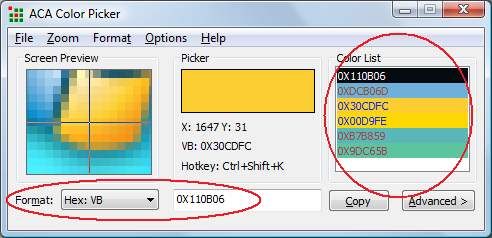
- Select Hex: VB on Format option. the Color List will show the picked colors in VB color code format, as it is shown in the following figure:
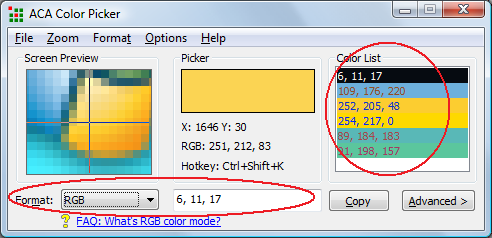
- You can also select RGB on Format option. It will show the picked color in RGB format, it can be used by RGB function, as it is shown in the following figure:
Free Trial ACA Color Picker Now | Buy ACA Color Picker Now
See Also
- What's ActionScript Color Code?
- What's CMY/CMYK Color Spaces?
- What's Delphi TColor format?
- What's HTML Hex Color Codes?
- What's HSB/HSV Color Spaces?
- What's HSL/HSL(Win) Color Spaces?
- What's HTML Color Spaces?
- What's RGB Color Spaces?
- What's VC++/WinAPI Color Code?
WinAPI Color References
* You may safely unsubscribe at any time!